You can travel without swapping your SIM card by installing a travel eSIM, a digital SIM that loads onto your phone from a QR code. Your physical SIM stays where it is, you skip the airport kiosk and the tiny ejector pin, and your phone gets local data the moment you choose the new line. For Israel, our prepaid eSIM comes with 350GB of 5G data, a local +972 number, 3,000 call minutes and 1,500 SMS, and you activate it with a single QR scan.
TL;DR
- A travel eSIM replaces the physical swap: you install it digitally and your home SIM can stay in the phone.
- Before you buy, check two things: that your phone supports eSIM, and that it is carrier-unlocked.
- Keep your home line on for texts and bank codes, and set the eSIM as your mobile-data line so the home plan does not bill you roaming charges.
- Our Israel eSIM includes 350GB of 5G data, a +972 number, 3,000 minutes and 1,500 SMS, in 14-day and 30-day versions.
- Removing a physical SIM can also cost you data stored on it, which is one more reason to leave it alone.
Table of Contents
- Why swapping a SIM is the hard way to get data abroad
- How a travel eSIM works
- Check your phone before you buy
- The no-swap setup: keep your number, add local data
- What roaming on your home plan really means
- Why the Israel eSIM suits no-swap travel
- Tips for a smooth arrival
- Where you will use it
- Who this is for
- Our perspective
- Get your Israel eSIM
- FAQ
- Sources
Why swapping a SIM is the hard way to get data abroad
The classic routine goes like this. You land, find a kiosk or vending machine, queue, pay, pop out your own SIM, push in a local one and hope the phone accepts it. Then you carry your home SIM around in a pocket for a week, where it can slip into a gap in a seat or vanish into a jacket.
That routine has costs beyond the time it takes:
- Your home number goes dark. While your own SIM sits in a pocket, calls and texts to your usual number do not reach you. Banks and apps that send login codes by text will not get through to the phone you are holding.
- You can lose saved data. Canada's Global Affairs guidance for travelers warns that removing or replacing a physical SIM can mean losing data saved on it, potentially including contacts, photos and text messages, and suggests checking whether you can save that data to a cloud service before the trip.
- You need a tool and a free hand. SIM trays are fiddly, and the first night in a new city is a bad time to drop a nano-SIM.
- You pay for a counter, not for data. Kiosk pricing usually reflects rent and a captive audience.
An eSIM removes every one of those steps. The FCC's eSIM guide explains that an eSIM is embedded in the phone and can be reprogrammed through the device's settings, which is why switching providers no longer needs a physical card change.
How a travel eSIM works
A travel eSIM is a prepaid plan delivered as a digital file. You buy it online, receive a QR code, scan it in your phone's settings, and the phone adds a new cellular line. Nothing is inserted or removed.
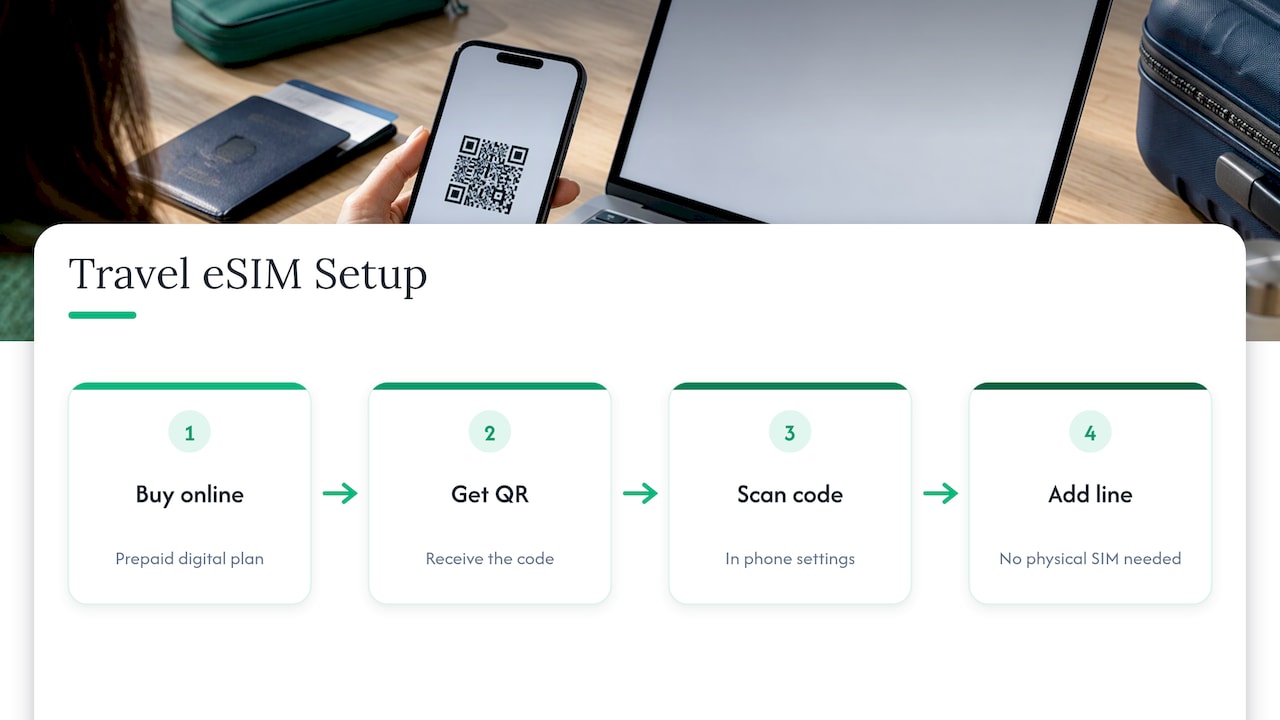
Apple's support guide on using eSIM while traveling says you can install a travel eSIM digitally and use it without obtaining, carrying or swapping a physical SIM. It also notes that plans may be bought online before the trip or in person after arrival, and that activation is commonly handled through a QR code or the provider's app.
The practical upside is timing. You can buy and set up at home, on your own Wi-Fi, instead of at a crowded arrivals hall. Our walkthrough on installing early and switching on at arrival covers that routine for Israel, and if you will not have Wi-Fi when you land, this guide to connecting with a single QR scan shows how to be ready.
Check your phone before you buy
Two prerequisites decide whether a no-swap setup works, and both take under a minute to check.
1. Does your phone support eSIM?
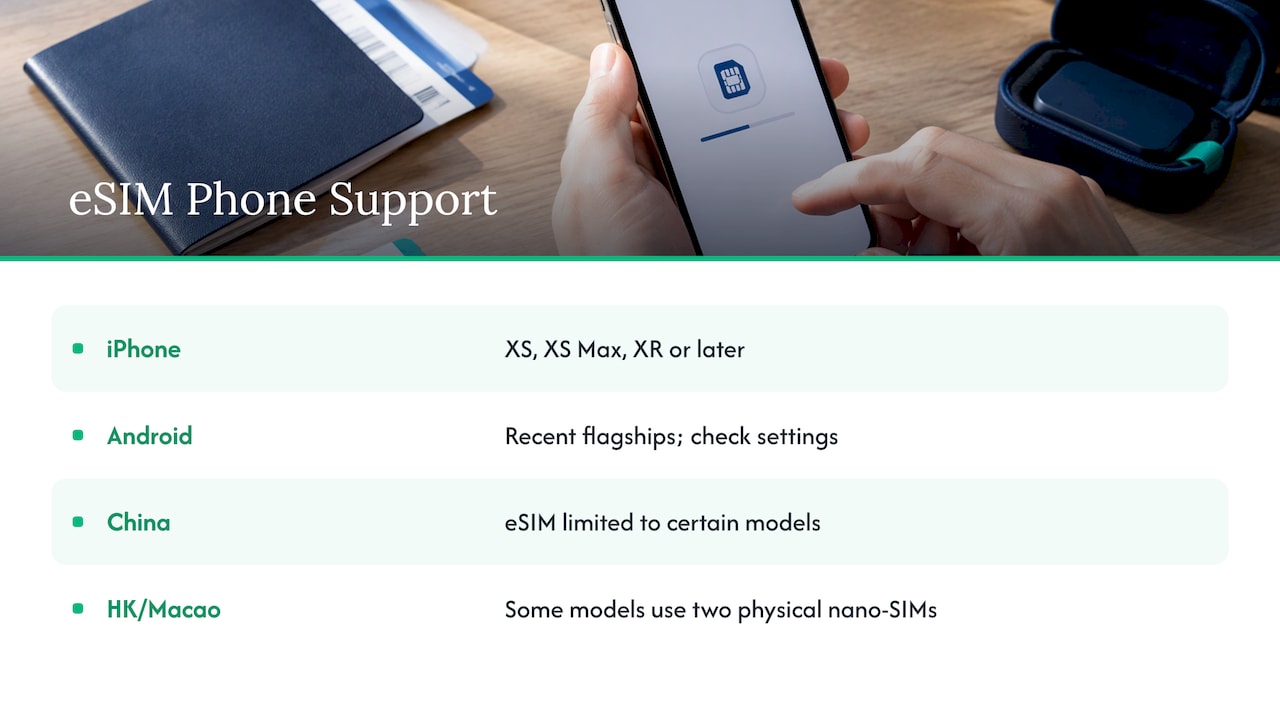
On the iPhone side, Apple lists iPhone XS, XS Max, XR or later as eSIM-capable. There is one regional exception that matters only if you route through China: eSIM support there is limited to certain models, and some Hong Kong and Macao models use two physical nano-SIMs instead. Israel is not affected by that exception.
Most recent Android flagships also support eSIM, but the exact list depends on the maker and model, so check your phone's settings menu for an option to add a mobile plan or eSIM. We also keep a dedicated page on Israel eSIM for Android, and an iPhone 15 setup guide for 5G eSIM on iPhone 15 in Israel.
2. Is your phone carrier-unlocked?
A carrier-locked phone only accepts plans from the carrier that sold it. For another provider's eSIM, Apple says the iPhone must be unlocked. To check, open Settings, then General, then About, and look beside Carrier Lock. If it says "No SIM Restrictions," you are unlocked.
If it is locked, the FCC's international roaming guide recommends contacting your carrier about unlocking, and notes that compatibility with networks at your destination can vary by phone model. Do this weeks before departure, not at the gate. Phones still paid off on installment plans are often the ones that remain locked.
The no-swap setup: keep your number, add local data
The most useful trick in no-SIM-swap travel is running two lines at once. Apple says supported iPhones can use two eSIMs, and iPhones with a SIM tray can use a physical SIM and an eSIM together while traveling. The FCC adds that some phones support both a removable SIM and an eSIM, which gives you two separate numbers on one device, with support depending on the phone and provider.
That gives you a clean division of labor:
| Job | Which line handles it |
|---|---|
| Maps, messaging apps, rideshare, streaming | Travel eSIM (mobile data) |
| Bank and app verification texts to your usual number | Home SIM (kept on) |
| Calls and texts to local businesses, hotels, drivers | Local +972 number on the eSIM |
| Calls from family at home to your usual number | Home SIM, if you accept the carrier's roaming terms |
The step-by-step version:
- Buy and install the eSIM. Scan the QR code under Settings, then Cellular (or Mobile Data) on iPhone, or the equivalent add-a-plan menu on Android.
- Label the lines. Name them something obvious, such as "Home" and "Israel." It prevents mistakes at 2 a.m. in a taxi.
- Set the eSIM for mobile data. This is the setting that does the work. Mobile data should run on the travel line only.
- Turn off data roaming on the home line. Apple's guide notes that with both lines on, the home line may still incur roaming fees. Switching off roaming on that line keeps it quiet.
- Switch on at arrival. Enable the eSIM line when you land and the phone connects to a local network.
We go deeper on this in our guides to dual SIM travel in Israel and primary versus secondary eSIM setup.
What about two-factor codes?
Many U.S. banks and apps send login codes by text to your existing number. If you move your whole identity to a new line, those messages can stop arriving. Leaving your home SIM in place avoids that problem entirely, and it is the main reason people choose a data-only add-on over a full number switch. Our page on switching to an Israel eSIM without 2FA lockouts explains the order of steps, and the telco PIN advice before you fly is worth five minutes at home.
What roaming on your home plan really means
The alternative to a travel eSIM is using your home carrier abroad. The FCC's guidance for U.S. customers is blunt that home plans often do not cover use overseas, and that voice, voicemail, texts and internet can all carry higher rates. It advises asking your provider how to track usage, and warns that roaming charges may show up in a later billing cycle after you are back.
That delayed bill is the part travelers miss. A phone that quietly pulled map updates and photo backups for a week can produce a charge you only see weeks later. Using a dedicated eSIM for data, with roaming off on the home line, closes that gap. If you are weighing it against a carrier day pass, our guide to avoiding roaming charges in Israel lays out the options by type, and the EE roaming comparison shows a worked example of roaming costs against an eSIM.
Why the Israel eSIM suits no-swap travel
We built our service for people landing in Israel who do not want to spend the first hour solving connectivity. Here is what is included:
- 350GB of high-speed 5G data, a large allowance meant to cover maps, video calls, rideshare and streaming without watching a meter.
- A local +972 number with 3,000 minutes of calls and 1,500 SMS, so you can reach hotels, tour guides and drivers on a local number. Our page on the Israel eSIM +972 number covers how that works with local apps like Gett and Wolt.
- QR code activation on iPhone and Android, with no SIM swap.
- Dual-SIM operation, so your home SIM stays in the phone.
- Unlimited app browsing on select platforms.
- No hidden fees, with flat pricing designed to come in well under airport kiosks and roaming.
There are two plan lengths: a 14-Day Traveler and a 30-Day Traveler. Pick by the length of your trip, and add a day or two of margin for delayed flights.
Tips for a smooth arrival
A few habits make the difference between connecting in a minute and troubleshooting on the curb.
- Install before you leave. Do it on home Wi-Fi, then leave the line switched off until you land. Switching it on at arrival is all that remains.
- Update your phone first. A current operating system makes the eSIM menus behave the way guides describe.
- Save your QR code. Keep the email, and take a screenshot of it, since you cannot scan the same code on two devices at once.
- Back up your phone. Even though you are not touching the physical SIM, a cloud backup before any trip protects contacts and photos, which is exactly what the Canadian guidance mentioned above is about.
- Turn on the right line for data. If pages will not load, the most common cause is that mobile data is still set to the home line.
- Restart if it does not register. Toggle airplane mode on and off, or restart the phone, and confirm the eSIM line is on and allowed to use mobile data.
If something still does not connect, our support page with real customer questions is the next stop.
Where you will use it
A 5G eSIM matters most where you are moving and navigating. In Tel Aviv you will lean on maps, rideshare and restaurant apps all day, and our Tel Aviv eSIM page shows the plan in that context. In Jerusalem, with its walled lanes and layered neighborhoods, a steady data connection helps with walking directions between sites, and the Jerusalem eSIM page covers it. Backpackers moving between cities benefit most from the no-swap idea: one install covers the whole stay, with no kiosks to find in each new place.
Who this is for
This setup suits tourists who want to land connected, business travelers who need a local number for meetings and deliveries, short-term visitors who live in their apps, and backpackers who would rather not handle SIM cards at all. It is a prepaid plan for a visit. It is not meant as ongoing phone service for people living in Israel.
Our perspective
We designed the Israel eSIM around one idea: connectivity should be done before you reach passport control, not started there.
Swapping a SIM is a chore that dates from when phones had no other option. With an eSIM, your own SIM stays in your phone, your home number keeps receiving the texts that matter, and the local line handles data, calls and messages. That is the setup we want every traveler to have.
We also think the allowance should remove the worry. That is why our plans carry 350GB of 5G data, a +972 number, 3,000 minutes and 1,500 SMS together, at flat pricing with no hidden fees. You should not have to ration a map or skip a video call to stay within a limit.
Whether you are in Israel for a long weekend or a month, the 14-Day and 30-Day Traveler plans are built so the only decision left is which one fits your dates.
sabraconnect
Get your Israel eSIM
If you are ready to skip the kiosk, our 14-Day Traveler and 30-Day Traveler plans give you 350GB of 5G data, a local +972 number, 3,000 minutes and 1,500 SMS, activated by QR code on iPhone or Android. Choose your plan on sabraconnect.com, install it before you fly, and switch it on when you land.

Your home SIM stays in your phone throughout, so your usual number keeps working for the texts you cannot afford to miss.
FAQ
Can I travel without swapping my SIM card at all?
Yes. Install a travel eSIM and select it for mobile data. Apple's guide confirms you can use a travel eSIM without obtaining, carrying or swapping a physical SIM. Your own SIM stays in the phone the whole trip.
Will I lose my contacts or messages if I use an eSIM?
Not from adding an eSIM, because your physical SIM is never removed. Canada's travel guidance warns that taking out a physical SIM can mean losing data stored on it, which is one reason to leave it in. A cloud backup before any trip is still sensible.
Do I need an unlocked phone?
Yes, to use another provider's plan. On an iPhone, open Settings, General, About, and look for "No SIM Restrictions" beside Carrier Lock. If your phone is locked, contact your carrier about unlocking before you travel, as the FCC recommends.
Can I keep getting texts on my home number?
Yes, if you keep the home line switched on. Set the travel eSIM as your mobile-data line and turn off data roaming on the home line, since Apple notes the home line may still incur roaming fees. That way verification texts can still arrive without the home plan using data abroad.
Is an eSIM better than a physical SIM for a short trip?
For a short visit, an eSIM saves the most effort: you can buy and install it before departure, and you never handle a card or a tray. You also avoid the airport counter and keep your home SIM in place.
Sources
- Use eSIM while traveling internationally with your iPhone, Apple Support
- eSIM Cards FAQ, Federal Communications Commission
- International Roaming: Mobile Phone Use Abroad, Federal Communications Commission
- Using data plans outside Canada, Global Affairs Canada